


Bhoomi Online: Access Karnataka Land Records & View RTC
Bhoomi Karnataka is the Karnataka Government's official online portal for viewing and downloading land records, including RTC (Pahani), Khata extracts, mutation details and revenue maps. You can check ownership, crop and dispute status for any survey number for free, and download a digitally signed i-RTC copy for a small fee.
About Bhoomi Karnataka
Bhoomi is a flagship system by the Karnataka Government that replaces manual land records with a digital platform. You can view your land’s ownership, area, crop details, liabilities, and dispute status online. The system reduces visits to revenue offices, supports loan and property transactions, and integrates with revenue and registration systems for improved accuracy and transparency. Documents obtained from Bhoomi are legally valid and widely accepted by banks and NBFCs.
Key Features of Bhoomi Karnataka
Below are the main services accessible on the Bhoomi Karnataka portal:
- View RTC (Pahani): Landowner, land area, soil type, and crop details.
- Check Mutation Status: Track ownership change requests and approvals.
- Download i‑RTC: Digitally signed RTC/Pahani for legal or loan use.
- View Khata Extract: Local property tax register details.
- Revenue Maps: Survey maps and layouts for boundary verification.
- Check Land Dispute Status: View ongoing dispute cases before property purchase.
How to Access Bhoomi Land Records Online?
Follow these steps to view your Karnataka land record:
- Go to the official portal: landrecords.karnataka.gov.in.
- Select View RTC and MR or related service.
- Choose District, Taluk, Hobli, and Village.
- Enter Survey Number or Owner’s Name.
- Click Fetch Details to view the record.
Documents You Can View or Download
Document | Purpose | Use |
RTC / Pahani | Land rights and details | Loan, sale, verification |
Khata Extract | Tax register record | Property tax, loan documentation |
Mutation Extract | Ownership history | Sale, inheritance, gift |
Revenue Map | Survey map | Boundary verification, dispute checks |
What is i‑RTC (Digitally Signed Copy)
- i‑RTC is a legally valid, digitally signed copy of your RTC/Pahani.
- Accepted by banks for loan processing and official purposes.
Why Bhoomi Karnataka Matters?
Using Bhoomi Karnataka provides:
- Transparency: Reduces tampering and corruption.
- Convenience: Access records anytime, anywhere.
- Verified Ownership: Prevents disputes and fraud.
- Loan Support: Documents used for home loan or loan against property approvals.
How to Apply for Mutation (Ownership Change)?
- A mutation updates ownership in government records after sale, inheritance, or gift.
- Apply online by submitting required documents (sale deed, identity proof).
Common Issues and Tips
- Record Not Updated: Recent transfers may take weeks to reflect.
- Khata vs RTC: Khata may update faster; verify both.
- Property Gift / Sale: Ensure mutation and khata updates after registration.
- Download Fees: Only for digitally signed certified copies; viewing is free.
How to Register at the Bhoomi Portal
To use the services offered by Bhoomi, you must first register on the portal.
Step 1: Visit for the official Bhoomi login page given above.
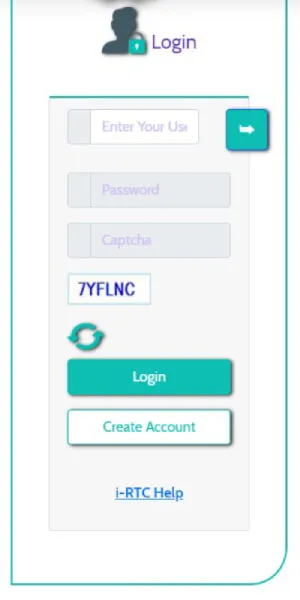
Step 2: Click 'Create Account' icon to redirect you to the Sign-up page.
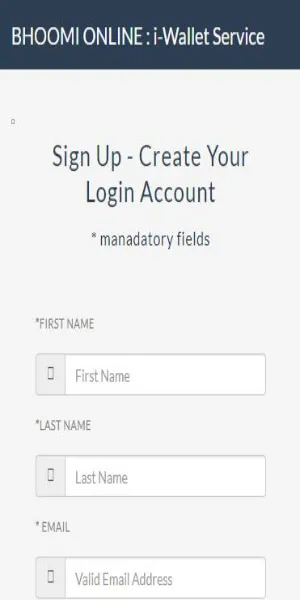
Step 3: Enter all the details required along with the Captcha Code Text.
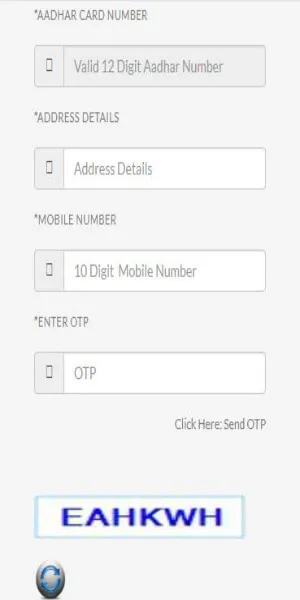
Step 4: Click on 'Sign Up/Submit' to register at the Bhoomi Portal.
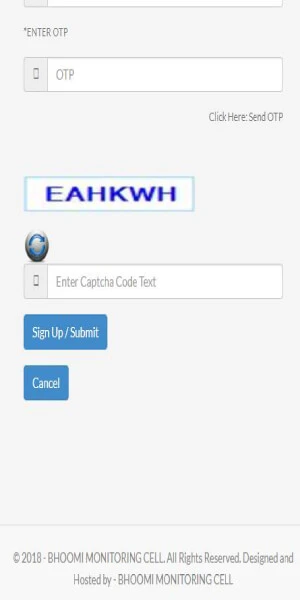
Since 23 June 2025, EKYC verification is mandatory to activate or use any Bhoomi/i-RTC account, and logging in requires two-factor authentication — your password plus an OTP sent to your registered mobile number.
Bhoomi Karnataka Land Registration Process
Registering land in Bangalore involves several steps. Below are the steps required to complete the registration:
Step 1: The individual must first purchase stamp paper and keep all the documents handy.
Step 2: Submit the documents to the Sub-Registrar responsible for the specific jurisdiction.
Step 3: After validating these documents, the individual must pay a fee for registering the land.
Step 4: He/she will then receive a receipt for the same.
Step 5: Officials will take the individual’s photo on the spot.
Step 6: The buyer and seller must provide verbal consent, along with a witness.
Step 7:The document is registered, and a unique registration number is assigned to it.
Step 8: After the registration process is complete, the rural land sale information is passed on to Patwari for adding the entries in the Jamabandi register, which is the Record of Rights.
How to Check RTC Online from Bhoomi?
Check the steps below to check your RTC online from the Bhoomi website
Step 1: Log in to the official Bhoomi website.
Step 2: Click on 'View RTC and MR'.
Step 3: This will take you to a new page which will request you to fill in the information.
Step 4: Here, fill in the information according to your requirements.
Step 5: Now, click on 'Fetch Details'.
Step 6: All the RTC details will now be available to you.
How to Check RTC (Pahani) on Bhoomi Online?
To view RTC for either the current or old year follow the below-mentioned steps:
- Visit the official Bhoomi portal
- Navigate to “RTC Services”.
- Then click on “View RTC and MR.”
- Select the Year, current year for latest RTC and Old year for RTC records from previous years/
- Enter land details
- Select your respective District, Taluk, Hobli, and Village.
- Enter Survey Number and, if applicable, Surnoc and Hissa Number.
- Click “Fetch Details” or “Go.”
- Verify the displayed owner’s name and land information.
- Once confirmed, click “View.”
- View the RTC Document
- The RTC will appear on screen, showing owner details, land type, area, crops, and liabilities.
- To navigate multiple pages, use “Next,” “Previous,” and “Last” buttons.
Note: Use the “i-RTC” service (available for a small fee) to download a valid PDF version by paying a minimum fee to obtain a digitally signed copy of RTC.
How to View Khata Extract?
The steps to view the Khata extract are listed below:
- Visit the official Bhoomi portal
- On the homepage, navigate to “RTC Services”.
- Click on “View Khata Extract.”
- Select your search method, either ‘By Khata Number’ or ‘By Survey Number’.
- Enter required details of the land.
- Choose District, Taluk, Hobli, and Village from the drop-down menus.
- Based on your search method, enter either Khata Number or Survey Number, based on your search method.
- To view the Khata Extract, click “Get Report” , which includes:
Note: Khata Extra consists of various details, such as name of the owner, Khata number, area of the property, and other details relevant for property tax assessment.
How to View and Download I-RTC on Bhoomi Online Portal?
The steps to view and download the I-RTC on Bhoomi Online portal and the details about I-RTC are mentioned below:
What is I-RTC?
The I-RTC (Instant Record of Rights, Tenancy, and Crops) service on the Bhoomi Online Portal allows Karnataka citizens to instantly download or print a certified, digitally signed RTC document by paying a fee of Rs.10. Users can avail themselves of this service without logging in and it is especially helpful for farmers, landowners, and property buyers who need official land records quickly for purposes such as loan applications, legal proceedings, or property verification. The I-RTC is a government-recognized document accepted by banks, courts, and various government agencies.
- Visit the official Bhoomi Portal.
- Under RTC Services, select “I-RTC” available on the homepage.
- Enter basic guest user details such as Name, Mobile Number, and Email ID.
- Provide land details to locate your RTC, such as District, Taluk, Hobli, Village.
- Select the Survey Number, Surnoc, and Hissa Number (if applicable) from the drop-down menu.
- To view the owner and land information, click “Fetch Details”.
- Review the displayed data and click “View RTC” to see the complete record.
- Select "Pay and Print I-RTC" and pay Rs.10 as fee.
- Download the certified, digitally signed I-RTC (PDF) after successful payment, which is valid for all official and legal purposes.
If your payment succeeds but the I-RTC does not print, Bhoomi Karnataka lets you retrieve the same copy later, without paying again, by entering your original order number on the portal's "Get Your Missed i-RTC" page.
How to View RTC Information?
To view RTC information, follow the below-mentioned steps:
- Visit the official Bhoomi portal.
- Navigate to “RTC Services”.
- Click on “View RTC Information.”
- Choose a search method, either ‘By Survey Number’, ‘By Registration Number/Date’ or ‘By Owner details’.
- Select District, Taluk, Hobli, Village, and Survey Number from drop-down menu for search method ‘By Survey Number’.
- Select Landowner Name and location details for search method by owner details.
- For search method ‘By Registration Number/Date’, enter Registration Number and Date.
- Enter the required details based on your chosen search method.
- Click “Fetch Details” to submit the information.
- View RTC Information
The portal will display owner name, survey details, land type, tenancy, and crop information.
How to Extract Mutation Report in Bhoomi Online Portal?
A Mutation Extract is an official record showing ownership changes in a land parcel due to sale, gift, inheritance, or partition. It includes the mutation number, owner details, survey number, transaction type, and application status. The Karnataka citizens view and download Mutation Extracts online without visiting revenue offices via the Bhoomi portal.
The steps to extract mutation report in Bhoomi portal are mentioned below:
- Visit the official Bhoomi portal
- Navigate to “RTC Services”.
- Click on “View RTC and MR.”
- Select the “Mutation Extract” option from the list of services.
- Enter the required land details.
- Select the respective District, Taluk, Hobli, and Village from the dropdown menu.
- Select the survey number of the land.
- Click “Fetch Details.”
- The portal will display all mutations linked to the survey number, including the Mutation Number, Date of Mutation, and Type of Transaction (e.g., Sale, Inheritance).
- Select the desired mutation record and click “Preview.”
- View the Mutation Extract.
Note: The Mutation Extract consists of old and new owner names; transaction date and details; reason for mutation; and authority that approved the mutation.
How to Check Mutation Status on Bhoomi Online?
The Bhoomi portal allows Karnataka citizens can track the status of mutation applications for land records via Bhoomi portal by following the below-mentioned steps:
- Visit the official Karnataka Land Records website:
- Navigate to “RTC Services”.
- Click on “View RTC and MR.”
- Select the “Mutation Status” option, on the RTC Form 16 page.
- Enter the required land details.
- Select the respective District, Taluk, Hobli, and Village from the dropdown menu.
- Select the survey number of the land.
- Surnoc Number and Hissa Number (if applicable)
- Click “Fetch Details.”
The portal will display the current mutation status:
- Approved: If mutation is completed and land records are updated.
- Pending: Application under process.
- Rejected: Application rejected, with reasons provided.
- No Mutation Pending: If there is no mutation for the entered survey number
Note: Use the Mutation Extract service to view dates and types of all past mutations, for a detailed history of ownership changes.
Bhoomi Online Revenue Map | SSLR
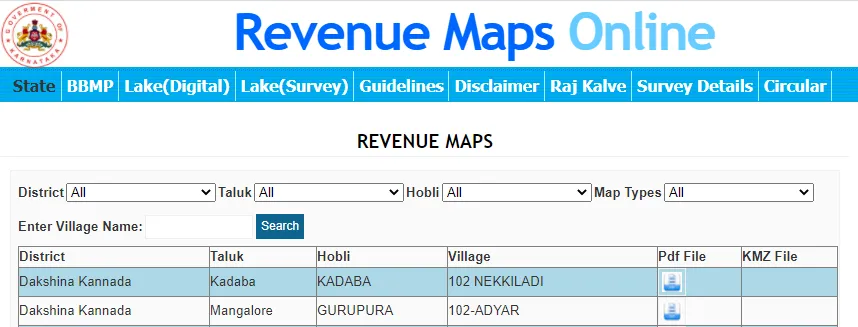
The Bhoomi Online Portal allows Karnataka citizens to access detailed village maps, cadastral maps, and survey documentation through the SSLR (Survey Settlement and Land Records) system, helping with property verification, urban planning, and resolving land disputes.
- Visit the official Karnataka Land Records website.
- On the homepage, go to “Survey (SSLR) Services” to access survey documents and various types of maps.
- Select the type of map you need.
- Enter location details to find specific maps.
- Select your District, Taluk, Hobli, and Village from the dropdown menu.
- Select Map Type
- Click to view available maps for the selected village.
The various types of maps available are:
- State Maps: Statewide geographic overview
- BBMP Maps: Bruhat Bengaluru Mahanagara Palike area maps
- Lake Maps (Digital): Digital representations of water bodies
- Lake Maps (Survey): Surveyed lake boundaries and data
- Cadastral Maps: Detailed individual land parcel information
- Geo-referenced Cadastral Maps: GPS-coordinated cadastral mapping
Note: Maps are usually provided in PDF format for download and reference.
Karnataka Land Documents Fees and Charges
The portal allows access to land-related documents such as RTC, Mutation Status, Tippan and Mutation Reports at Kiosk Centres spread across the state.
You can visit the nearest Land Records (LR) Kiosk and submit your application along with a nominal user fee to receive your land related documents. The user fee payable for each document is as follows:
Document | Fees |
Tippan | Rs.15 |
Mutation Status | Rs.15 |
Mutation Extract | Rs.15 |
Record of Rights, Tenancy and Crops (RTC) | Rs.10 |
Contact Details
The contact details of the official Bhoomi Monitoring Cell are mentioned below:
- Address: SSLR Building, K.R. Circle, Bangalore - 560001
- Helpline number: 080-22113257, 080-22113256
- Email: bhoomi@karnataka.gov.in



FAQs on Bhoomi, Karnataka's online Land Records
1.What is Bhoomi Karnataka?
Bhoomi Karnataka is the Karnataka Government's official online portal for viewing and downloading land records such as RTC (Pahani), Khata extracts, mutation details and revenue maps. It replaces manual revenue office visits with round-the-clock digital access. Documents issued through Bhoomi Karnataka are legally valid and accepted by banks and courts.
2.What services can I access on the Bhoomi Karnataka portal?
The Bhoomi Karnataka portal lets you view your RTC (Pahani), track mutation status, download a digitally signed i-RTC, view your Khata extract, access revenue maps and check land dispute status. Viewing services are free; only certified downloads carry a fee, shown in the fee table above. Each service sits under the portal's RTC Services or Survey (SSLR) Services menu.
3. How do I access Bhoomi Karnataka land records online?
Visit the official Bhoomi Karnataka portal, select the RTC or MR service you need, and choose your District, Taluk, Hobli and Village. Enter your Survey Number or the owner's name and click Fetch Details to view the record. You can then view it online or download a certified copy where one is available.
4. Is Bhoomi Karnataka documentation legally valid?
Yes, digitally signed RTC and i-RTC copies issued through Bhoomi Karnataka are legally valid and accepted by banks, courts and government agencies for loan, sale and verification purposes.
5. What is i-RTC on Bhoomi Karnataka?
i-RTC is a digitally signed, certified copy of your RTC/Pahani that you can generate directly from Bhoomi Karnataka without visiting a revenue office. It is accepted by banks and NBFCs for loan processing. Viewing your RTC on Bhoomi Karnataka is free; only the certified i-RTC download carries the fee shown in the fee table above.
6.Do I need to register to use i-RTC on Bhoomi Karnataka?
No, you can generate an i-RTC on Bhoomi Karnataka as a guest by entering basic details such as your name, mobile number and email ID. A registered account is only needed for services you must track over time, such as mutation applications. Registered Bhoomi accounts also require EKYC verification and two-factor login.
7.How do I register an account on the Bhoomi Karnataka portal?
Go to the official Bhoomi Karnataka login page and select 'Create Account' to open the sign-up form. Fill in the required details along with the captcha code and click 'Sign Up/Submit' to complete registration. EKYC verification and two-factor authentication are mandatory for all registered Bhoomi Karnataka accounts.
8.How is land registered on Bhoomi Karnataka?
Land registration in Karnataka begins with purchasing stamp paper and submitting documents to the Sub-Registrar of the relevant jurisdiction. Once the fee is paid and both parties give consent before a witness, the document is registered and assigned a unique registration number. The sale information then feeds into the Jamabandi register that Bhoomi Karnataka draws on.
9. How do I check my RTC on Bhoomi Karnataka?
Select 'View RTC and MR' on the Bhoomi Karnataka portal, then fill in your District, Taluk, Hobli, Village and Survey Number. Click 'Fetch Details' to display your RTC on screen. You can view records for the current year or, where available, earlier years.
10.What details appear on a Bhoomi Karnataka RTC?
A Bhoomi Karnataka RTC shows the owner's name, land type, area and crop details, along with any liabilities recorded against the survey number. Tenancy information is also included where applicable. Use the Next, Previous and Last buttons on the portal to move through multi-page records.

Nishit Kunal, currently working as an Editor has been with BankBazaar for over 5 years with expertise in writing on loan, credit cards, etc. When not working, Nishit dabbles between being a cinephile, writing, and playing with his dogs.

Disclaimer
Credit Card:
Credit Score:
Personal Loan:
Home Loan:
Fixed Deposit:


Copyright © 2026 BankBazaar.com.